DREO Smart Tower Fan Review (2026) — WiFi, Alexa, Google Home, and App Scheduling
Most "smart" fan features are gimmicks. An app to turn on a fan you can reach from your chair is pointless. But if you already have Alexa or Google Home in your bedroom, saying "turn the fan to sleep mode" at lights-out without touching anything crosses a real-use-case line. The DREO Smart tower fan takes the same quiet, 9-speed foundation of the standard DREO line and adds 2.4 GHz WiFi, full voice-assistant integration, and app-based scheduling. Whether that's worth the premium depends entirely on your existing setup.
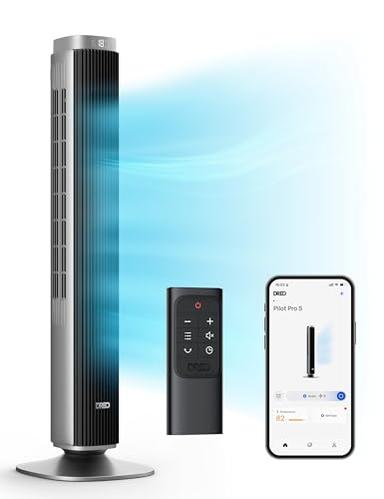
Best Smart Tower Fan
DREO Smart Tower Fan — WiFi + Voice
4.4★ · 3,500+ reviews · ~$95–$110 · Alexa + Google Home
Is This Page For You?
- ✅ You have an Alexa Echo or Google Nest device in the room and want hands-free fan control
- ✅ You want to schedule the fan to turn on before you get home in summer
- ✅ You want to control your fan from another room or remotely via app
- ❌ You don't use smart home devices — buy the standard DREO 42-inch and save $20–30
- ❌ You need 120° oscillation — see the DREO Cruiser Pro review
What Buyers Love
- ✓Voice control that actually works — "Alexa, turn fan to speed 3" and "Alexa, set fan to sleep mode" work reliably once paired
- ✓App scheduling: set the fan to turn on at 9 p.m. and off at 6 a.m. automatically, every day, without touching anything
- ✓Remote access via app — turn the fan on before you get home so the room is cool when you arrive
- ✓Same near-silent sleep mode as the standard DREO — ~25 dB at minimum, display fully off
- ✓Physical remote still included — works independently of WiFi if you prefer tactile control or the network is down
- ✓Works on 2.4 GHz WiFi (most home routers) — setup takes under 5 minutes via the DREO app
Trade-offs
- ✗2.4 GHz only — if your router broadcasts only 5 GHz you'll need to enable a 2.4 GHz band or use a 2.4 GHz extender
- ✗$20–30 premium over the standard DREO with identical core fan performance — only justified if you use the smart features
- ✗DREO app required for initial WiFi pairing — a one-time 5-minute setup, but required before voice control works
- ✗90° oscillation, not 120° — same limitation as the standard model; for wider room coverage see the Cruiser Pro
Specs at a Glance
| Speeds | 9 settings |
| Oscillation | 90° |
| WiFi | 2.4 GHz |
| Voice Control | Alexa, Google Home |
| App | DREO (iOS + Android) |
| Noise (min) | ~25 dB |
| Timer | Up to 12 hours (or full app scheduling) |
| Remote | Included (works offline) |
Frequently Asked Questions
Does the DREO Smart fan work with Alexa and Google Home?
Is the DREO Smart fan worth the price premium?
What happens if the WiFi goes down — does it still work?
The Smart Fan That Earns the “Smart” Label
Voice control from your smart speaker at lights-out. App scheduling so it runs while you're commuting home. Remote access so you don't get up. If you have the ecosystem, the DREO Smart is the pick.
Check Current Price on Amazon →Compare Other Tower Fans
Get our best picks in your inbox
No spam. Just honest Amazon reviews, once a week.
Unsubscribe any time. We'll never sell your address.